贡献指南
感谢您对QLLVM项目的关注和支持!我们欢迎各种形式的贡献,包括代码、文档、测试、问题报告等。本指南将帮助您了解如何为QLLVM项目做出贡献。
行为准则
参与QLLVM项目的所有贡献者都应遵守以下行为准则:
尊重他人,保持友好和专业的态度
接受建设性批评
关注社区的最佳利益
对其他贡献者表示同理心
如何贡献
报告问题
如果您发现了bug或有新功能建议,请在GitHub上提交 Issue。在提交Issue时,请提供以下信息:
问题的详细描述
重现问题的步骤
期望的行为
实际的行为
环境信息(操作系统、Python版本、QLLVM版本等)
相关的错误信息或日志
贡献代码
扩展开发指南
在提交代码前,请根据您的贡献类型参考以下开发指南。
添加 MLIR 优化 Pass
1. 创建 Pass 源文件
在 qllvm/mlir/transforms/optimizations/ 下新增优化 Pass 的源码。
new.hpp 示例
qllvm/mlir/transforms/optimizations/new.hpp1#pragma once 2#include "Quantum/QuantumOps.h" 3#include "mlir/Pass/Pass.h" 4#include "mlir/Pass/PassManager.h" 5#include "mlir/Target/LLVMIR.h" 6#include "mlir/Transforms/DialectConversion.h" 7#include "mlir/Transforms/Passes.h" 8#include <unordered_map> 9#include <tr1/unordered_map> 10#include <iostream> 11#include <unordered_set> 12 13using namespace mlir; 14 15namespace qllvm { 16struct new 17 : public PassWrapper<new, OperationPass<ModuleOp>> { 18 void getDependentDialects(DialectRegistry ®istry) const override; 19 void runOnOperation() final; 20 new() {}; 21 new(std::unordered_set<std::string> basicgate){ 22 basic_gate = basicgate; 23 } 24 new(std::map<std::string, bool> bool_args,int &opt_count, int &opt_depth, int &cir_depth, int &zero_count, int &enable, int &pass_count) { 25 if(bool_args.find("pass_effect") != bool_args.end()){ 26 printCountAndDepth = false; 27 p = &opt_count; 28 q = &opt_depth; 29 c_d = &cir_depth; 30 } 31 if(bool_args.find("syn_opt") != bool_args.end()||bool_args.find("customPassSequence") != bool_args.end()){ 32 syn = true; 33 o = &zero_count; 34 e = &enable; 35 c_d = &cir_depth; 36 } 37 if(bool_args.find("pass_count") != bool_args.end()){ 38 c = &pass_count; 39 f = true; 40 } 41 } 42 43 private: 44 bool printCountAndDepth = false; 45 bool syn = false; 46 bool f = false; 47 int *p = nullptr; 48 int *q = nullptr; 49 int *o = nullptr; 50 int *e = nullptr; 51 int *c = nullptr; 52 int *c_d = nullptr; 53 int before_gate_count = 0; 54 int before_circuit_depth = 0; 55 int after_gate_count = 0; 56 int after_circuit_depth = 0; 57 std::unordered_set<std::string> basic_gate; 58 std::vector<mlir::quantum::ValueSemanticsInstOp> top_op; 59 std::string passname = "new"; 60}; 61}
new.cpp 示例
qllvm/mlir/transforms/optimizations/new.cpp1#include "new.hpp" 2#include "Quantum/QuantumOps.h" 3#include "mlir/Dialect/LLVMIR/LLVMDialect.h" 4#include "mlir/Dialect/StandardOps/IR/Ops.h" 5#include "mlir/IR/Matchers.h" 6#include "mlir/IR/PatternMatch.h" 7#include "mlir/Pass/Pass.h" 8#include "mlir/Pass/PassManager.h" 9#include "mlir/Target/LLVMIR.h" 10#include "mlir/Transforms/DialectConversion.h" 11#include "mlir/Transforms/Passes.h" 12 13namespace qllvm { 14using namespace std::complex_literals; 15 16void new::getDependentDialects(DialectRegistry ®istry) const { 17 registry.insert<LLVM::LLVMDialect>(); 18} 19 20void new::runOnOperation() { 21 22} 23}
2. 挂载到 PassManager
在 qllvm/mlir/transforms/pass_manager.hpp 的 configureOptimizationPasses 中,将新 Pass 挂到 mlir::PassManager 上。
编译器支持两种配置方式:
默认顺序:基于
PassManagerOptions``(例如 ``customPassSequence)的定制序列默认启用:在默认分支里直接调用
addPass可选启用:按现有宏与
switch模式扩展
方式一:默认启用
在 configureOptimizationPasses 中添加:
passManager.addPass(std::make_unique<new>());
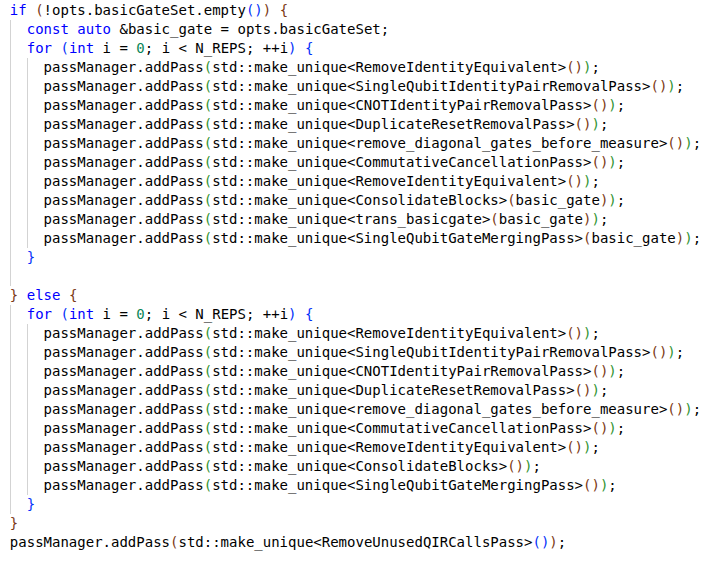
方式二:可选启用(通过宏与 switch)
定义宏:在
pass_manager.hpp中添加#define NEW 12
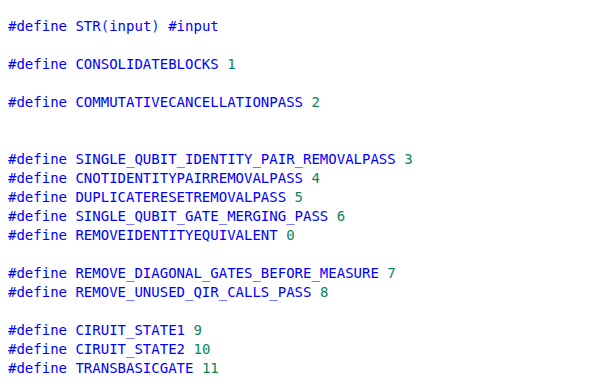
在
passNames中新增"NEW"在
for循环中新增对应的case分支

增加输入语言支持
1. 实现解析器
在 qllvm/mlir/parsers/ 下创建语言子目录:
编写 ANTLR 语法文件(
.g4)并生成词法/语法分析代码实现 Visitor 和
*_mlir_generator,将 AST 逐步降为 MLIR参考现有实现:
qasm3/、qiskit/、qcis/
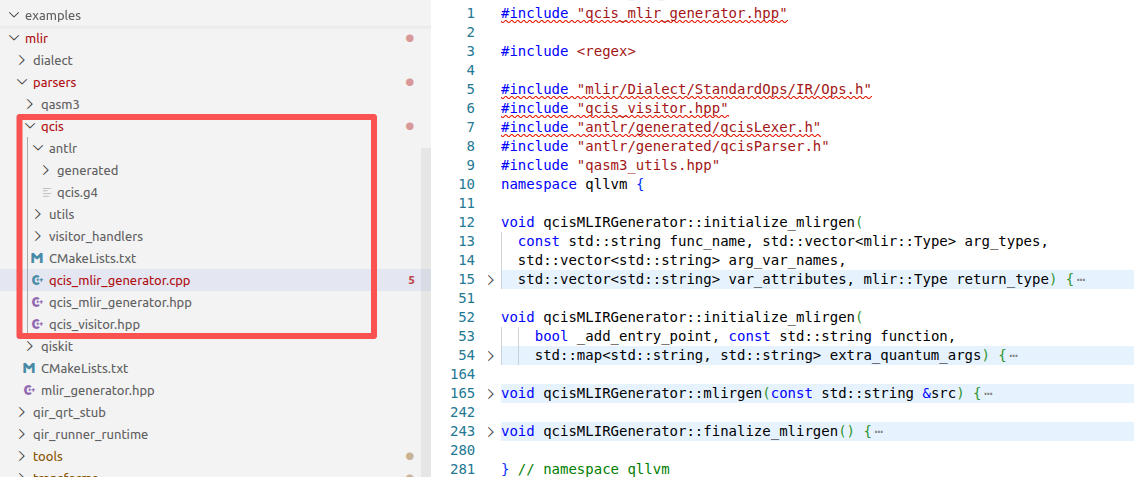
2. 添加路由
在 qllvm/mlir/tools/qllvm-mlir-helper.hpp 的 loadMLIR 中增加路由:
扩展
SourceLanguage枚举按文件内容、扩展名或调用参数选择对应的生成函数
返回
OwningModuleRef及统一的MlirGenerationResult语义
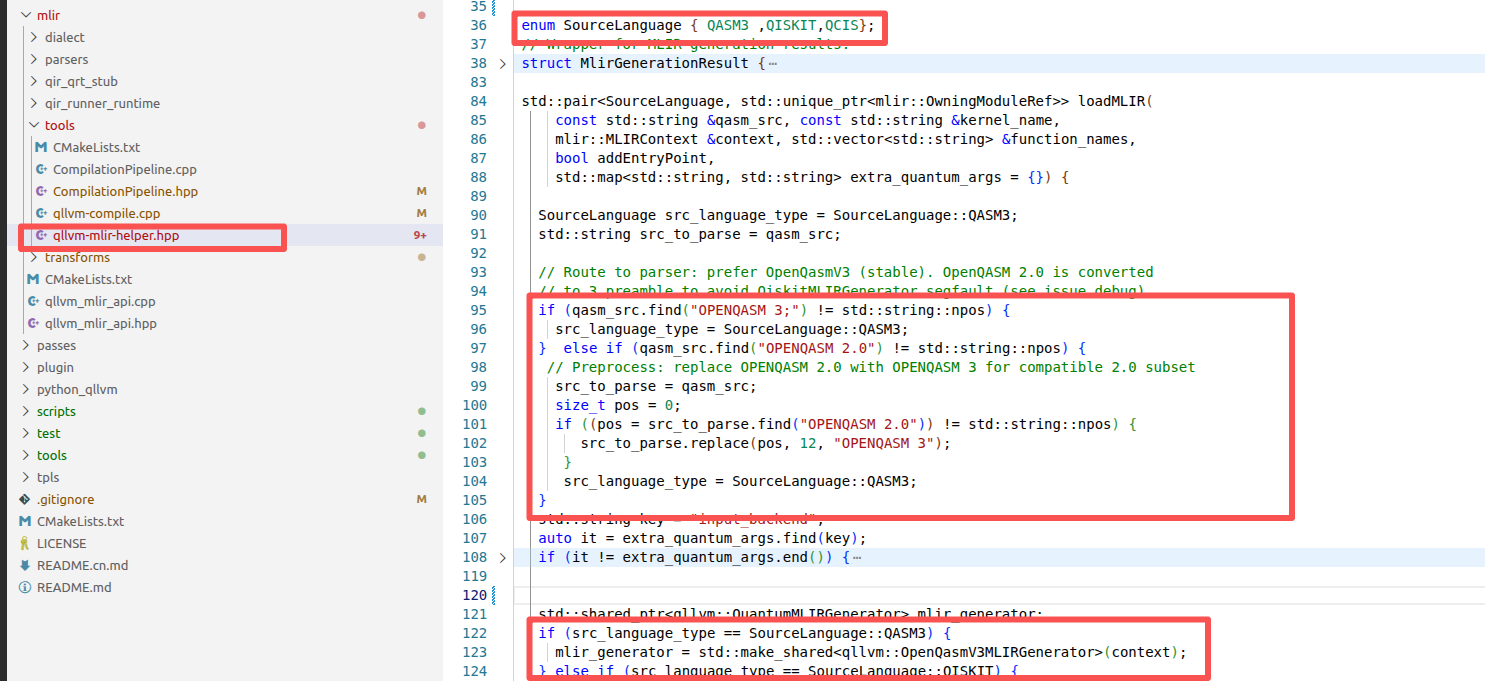
增加后端类型
1. 实现后端逻辑
在 qllvm/backend/backends/ 中实现后端的 emit 方法(QIR 到目标表示的转换),与现有 QasmBackend、TianyanBackend 等并列。
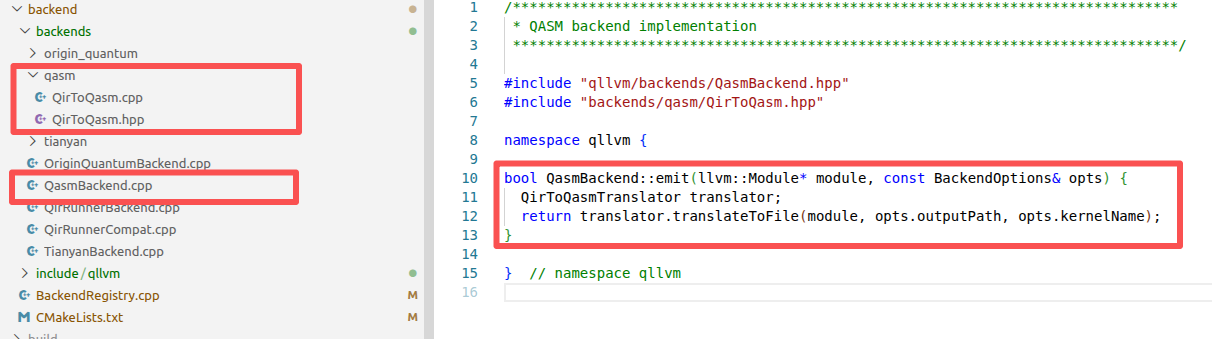
2. 声明后端类
在 qllvm/backend/include/qllvm/backends/ 中声明对应的后端类。
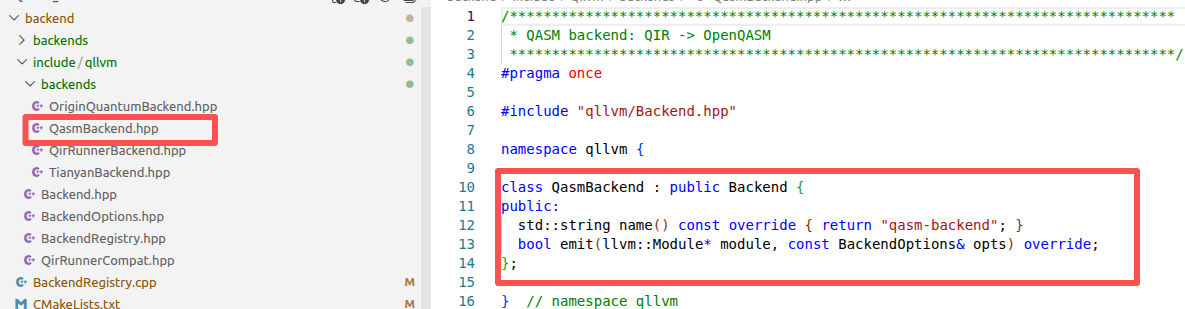
3. 注册后端
在 qllvm/backend/BackendRegistry.cpp 的 registerBuiltinBackends() 中注册:
BackendRegistry::instance().registerBackend(
    std::make_unique<YourBackend>());
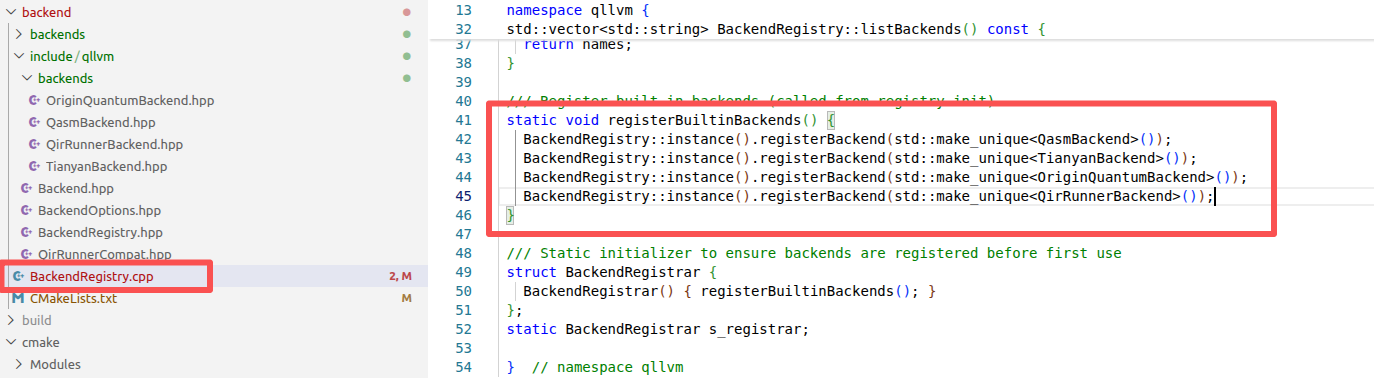
注册后,运行时即可通过名称解析到该实现。
Note
新增文件通常还需在相关 CMakeLists.txt 中加入编译目标及链接依赖。
提交 Pull Request
完成代码修改后,按以下步骤提交贡献。
Fork 仓库:在 GitHub 上将 QLLVM 仓库 Fork 到个人账户
克隆并创建分支
git clone https://github.com/your-username/QLLVM.git
cd qllvm
git checkout -b feature/your-feature-name
安装开发依赖
pip install -e .[dev]
进行修改并测试
pytest
提交并推送
git add .
git commit -m "Add feature: brief description"
git push origin feature/your-feature-name
创建 Pull Request:在 GitHub 上创建 PR,清晰描述您的更改,等待维护者审核
Tip
保持代码风格与项目一致
添加适当的测试用例
使用清晰、规范的提交信息
贡献文档
如果您想贡献文档,请按照以下步骤操作:
Fork和克隆仓库(同代码贡献步骤1-2)
创建分支(同代码贡献步骤3)
安装文档依赖
安装文档构建依赖
pip install -e .[docs]
修改文档
修改或添加文档内容
确保文档风格一致
检查链接是否有效
构建文档
构建文档确保没有错误
cd docs
make html
提交更改(同代码贡献步骤7-9)
贡献测试
如果您想贡献测试,请按照以下步骤操作:
Fork和克隆仓库(同代码贡献步骤1-2)
创建分支(同代码贡献步骤3)
安装测试依赖
安装测试依赖
添加测试
添加新的测试用例
确保测试覆盖新功能或修复的bug
运行测试
运行测试确保测试通过
提交更改(同代码贡献步骤7-9)
代码风格
QLLVM项目遵循以下代码风格:
Python代码:遵循PEP 8规范 - 使用4个空格进行缩进 - 行长度不超过79个字符 - 导入顺序:标准库、第三方库、本地模块 - 使用文档字符串记录函数和类
文档:遵循reStructuredText格式 - 使用清晰的标题层级 - 代码示例使用正确的语法高亮 - 链接使用相对路径
提交信息:使用清晰的提交信息 - 第一行:简短的描述(不超过50个字符) - 空行 - 详细描述(如果需要) - 引用相关的Issue(如果有)
沟通渠道
GitHub Issues:用于报告问题和讨论功能
GitHub Discussions:用于讨论项目相关的话题
邮件列表:如果有邮件列表,请在这里提供
贡献者指南
首次贡献
如果您是第一次贡献开源项目,以下资源可能会有所帮助:
[How to Contribute to Open Source](https://opensource.guide/how-to-contribute/)
[First Contributions](https://firstcontributions.github.io/)
[GitHub Docs: Fork a repo](https://docs.github.com/en/get-started/quickstart/fork-a-repo)
代码审查
所有的Pull Request都会经过代码审查。在审查过程中,您可能需要根据审查意见进行修改。请保持耐心和开放的态度,代码审查是提高代码质量的重要环节。
许可证
通过贡献代码到QLLVM项目,您同意您的贡献将在项目的许可证下发布。
致谢
感谢所有为QLLVM项目做出贡献的人!您的贡献是项目成功的关键。