Usage
This section mainly introduces how to use QLLVM to compile quantum circuits, as well as detailed explanations of compilation parameters.
Usage Examples
Using Plugins
Cloud Usage
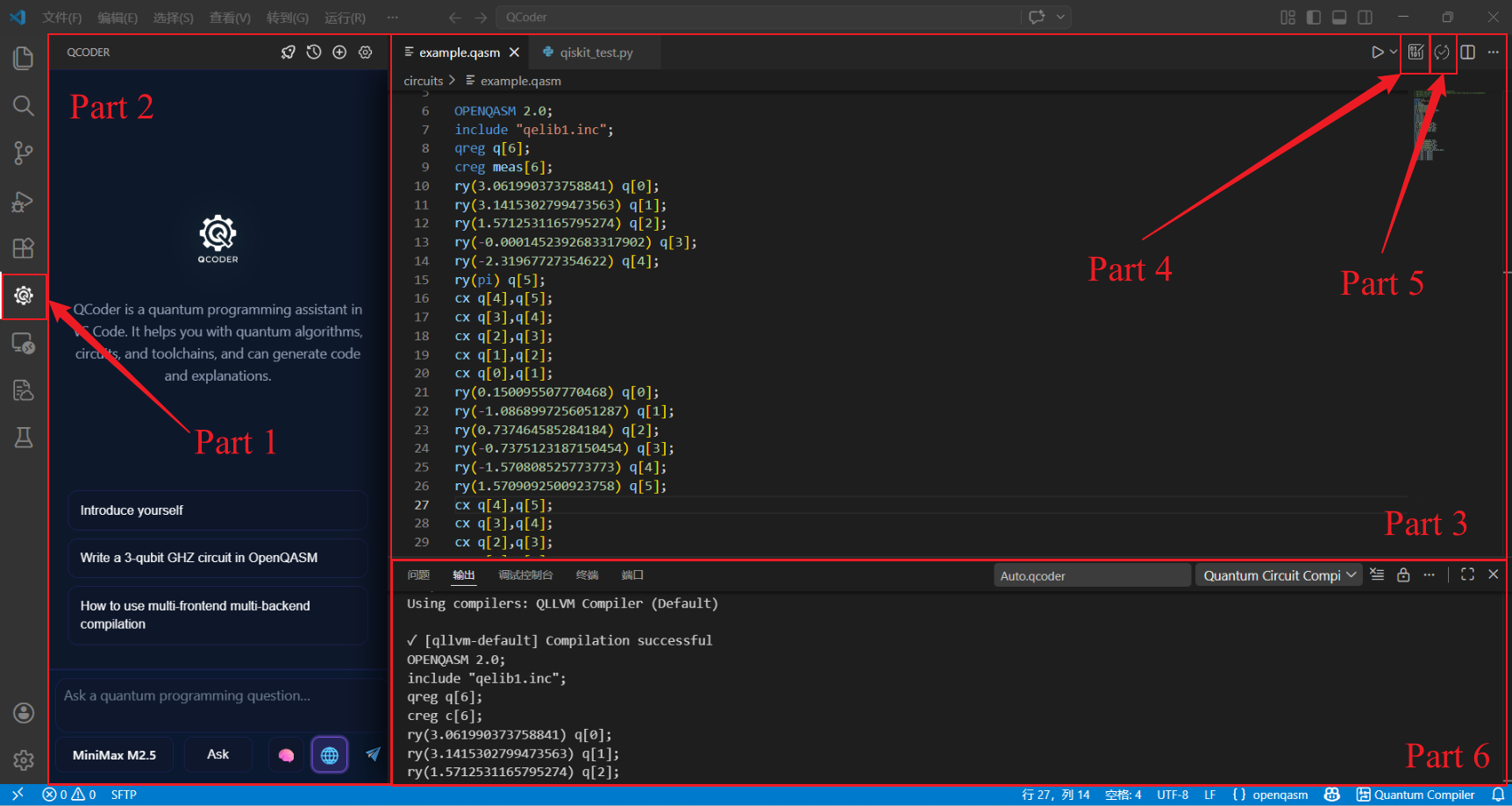
VScode Plugin Interface
Area |
Feature Description |
|---|---|
① Qcoder Sidebar |
Click to use Qcoder intelligent programming assistant |
② Qcoder Main Interface |
Intelligent interactive interface |
③ Code Interface |
Used to display quantum programs |
④ Compile Button |
Click to compile the code interface or selected quantum program |
⑤ Run Button |
Click to run the code interface or selected quantum program |
⑥ Output Interface |
Output the compiled quantum circuit and various parameters |
Quantum Circuit Composer
Quantum Circuit Composer is a Visual Studio Code plugin with the following main features:
Multi-compiler support: Configure multiple compilers (self-developed QLLVM, IBM Qiskit, Origin QPanda) simultaneously, compile in parallel with one click, and automatically generate result comparison tables.
Multi-frontend input: Supports QASM, Qiskit Python code, QPanda Python code, OriginIR, QCIS and other input formats, which are uniformly converted to QASM for compilation.
Remote/local compilation: Uses remote server compilation by default (no local compiler installation required), and can also be switched to local compilation.
QIR simulator: Run QIR simulator directly in the plugin to view measurement result statistics.
Statistical comparison: Automatically extracts the number of gates, two-qubit gates, and depth from each compiler after compilation, and generates a comparison table.
Graphical settings: Manage compiler configurations through the settings panel, easily enable/disable, and edit parameters.
Quick start:
Install the plugin
Search for “Quantum Circuit Composer” in the VSCode extension store and install it.
After installation, a circuit board icon will appear in the status bar, click to open the settings panel.
Write quantum circuit
Create a new file, supporting .qasm (OpenQASM), .py (Qiskit/QPanda code), .originir, .qcis, etc.
For example, a simple Bell state QASM file:
OPENQASM 2.0;
include "qelib1.inc";
qreg q[2];
creg c[2];
h q[0];
cx q[0],q[1];
measure q[0] -> c[0];
measure q[1] -> c[1];
Compile file
Right-click on the file and select “Compile current quantum circuit file”.
Or open the settings panel and click “▶ Select file to compile” at the top.
The plugin will use all enabled compilers to compile in parallel and display results and statistical comparison tables in the output channel.
Run QIR simulator
In the compiler list of the settings panel, find the QLLVM compiler and click the “▶ Run simulator” button on its right.
Enter shots (number of runs) and random seed (optional) in the pop-up input box.
After simulation is complete, the output channel will display measurement result statistics.
qcoder-chat
VS Code Sidebar AI Assistant for Quantum Computing Learning and Development
qcoder-chat focuses on quantum code intelligent development, providing AI dialogue programming, intelligent code completion, and autonomous Agent task execution. It connects downward to compilation and running, providing high-quality quantum code and task instructions for qcoder-compiler, serving as the development interaction entry point. It allows users to add SCNet, Alibaba Cloud, DeepSeek and other vendor large models to qcoder-chat.
Tip
When using the built-in free Shuguang large model, you can directly use qcoder-chat quantum programming functions without configuring an API Key.
Quick start:
Installation
Search and install in the VS Code extension view, or use Install from VSIX… to install the .vsix distributed by the organization.
Configure API Key (according to the model you actually use)
Open the command palette (Ctrl+Shift+P / Cmd+Shift+P):
QCoder: Set QCoder Qwen API Key: Add Alibaba Cloud Baillan large model
QCoder: Set QCoder DeepSeek API Key: Add DeepSeek large model
QCoder: Set QCoder SCNet API Key: Add SCNet large model
Open chat
Click the qcoder-chat icon in the activity bar to open the sidebar chat, or run Chat with Quantum Programming Assistant.
Sidebar settings
Open Settings in the title bar or interface: manage the list of added large models, interface language, etc.
Using Command Line
Compiling Pure Quantum Programs
Compiling OpenQASM Files
Basic compilation:
# Using qllvm
qllvm test.qasm -qrt nisq -qpu qasm-backend -O1
# Output: test_compiled.qasm
Specify output path:
qllvm test.qasm -qrt nisq -qpu qasm-backend -O0 -o folder/try
# Output: folder/try.qasm
Specify basis gate set:
qllvm test.qasm -qrt nisq -qpu qasm-backend -O1 -o folder/try \
  -basicgate=[rx,ry,rz,h,cx]
With backend topology (SABRE mapping):
qllvm test.qasm -qrt nisq -qpu qasm-backend -O1 \
  -qpu-config backend.ini -initial-mapping '[0,1,2]' \
  -sabre-cpp
Bell State Example
Create bell.qasm:
OPENQASM 2.0;
include "qelib1.inc";
qreg q[2];
creg q_c[2];
h q[0];
CX q[0], q[1];
measure q[0] -> q_c[0];
measure q[1] -> q_c[1];
Compile and check output:
qllvm bell.qasm -qrt nisq -qpu qasm-backend -O1
cat bell_compiled.qasm
Directly Calling qllvm-compile
# Without SABRE
qllvm-compile test.qasm -internal-func-name test \
  -emit-backend=qasm-backend -output-path=test_out.qasm

# With SABRE (linear chain 0-1-2)
qllvm-compile test.qasm -internal-func-name test \
  -emit-backend=qasm-backend -output-path=test_sabre.qasm \
  -sabre-coupling-map="0,1;1,2"
Printing MLIR / QIR
qllvm test.qasm -emitmlir -qrt nisq -qpu qasm-backend -O1
qllvm test.qasm -emitqir -qrt nisq -qpu qasm-backend -O1
Backend Topology Configuration Example
backend.ini or qpu_config_chain3.txt:
# Linear chain: 0-1-2
connectivity = [[0, 1], [1, 2]]
QIR Runner Backend Configuration Example
Output LLVM bitcode (.bc) for QIR Runner simulator loading. qllvm has built-in QirRunnerCompat to automatically adapt to qir-runner’s QIR base profile (__quantum__rt__initialize signature, __body suffix, mz result index, etc.).
# 1. Install qir-runner (conda qllvm environment)
conda activate qllvm
pip install qirrunner

# 2. Use qllvm-compile to generate .bc
qllvm-compile bell.qasm -qrt nisq -qpu qir-runner -O1 \
  -emit-backend=qir-runner -output-path=bell.bc

# 3. Run with qir-runner
qir-runner -f bell.bc -s 5
qir-runner Output Format Explanation
Output structure for each shot:
Line |
Meaning |
|---|---|
START |
A shot begins |
METADATAtEntryPoint |
Entry point metadata |
RESULTt0 or RESULTt1 |
Measurement results for each qubit (in measurement order) |
ENDt0 |
The shot ends |
Example (Bell circuit 5 shots):
START
METADATA    EntryPoint
RESULT      0
RESULT      0
END 0
START
METADATA    EntryPoint
RESULT      1
RESULT      1
END 0
...
qir-runner Command Line Parameters
Parameter |
Description |
Default |
|---|---|---|
-f, –file <PATH> |
QIR bitcode file path (required) |
|
-s, –shots <NUM> |
Number of simulation shots |
1 |
-r, –rngseed <NUM> |
Random number seed (for reproducibility) |
Random |
-e, –entrypoint <NAME> |
Entry function name |
EntryPoint |
Output as Qiskit-style Counts
Use scripts/qir_runner_counts.py to convert raw output to Qiskit-style get_counts() dictionary:
# Pipe method
qir-runner -f bell.bc -s 100 | python3 scripts/qir_runner_counts.py -

# Directly specify bc and parameters
python3 scripts/qir_runner_counts.py bell.bc -s 100 -r 42
Output example (Bell state): {‘00’: 48, ‘11’: 52}
Collaborative test script: ./scripts/test_qllvm_qirrunner.sh
.bc is standard LLVM bitcode, which can be loaded by tools like [qir-alliance/qir-runner](https://github.com/qir-alliance/qir-runner) (requires Python 3.9+).
Ion Trap Backend Compilation Example
The compiler supports compiling to QASM programs for ion trap backends. When specifying -qpu as trappedion-qasm, the output is a QASM program targeting Quantinuum.
Compilation command:
qllvm test.qasm -qrt nisq -qpu trappedion-qasm -O1
Compiled quantum program example:
OPENQASM 2.0;
include "hqslib1.inc";
qreg q[2];
creg c[2];
U1q (-1*pi, 0.25*pi) q[0];
U1q (2*pi, 0.5*pi) q[0];
U1q ( 2.5*pi, 0.5*pi) q[1];
RZZ (0.5*pi) q[0], q[1];
U1q (0.5*pi, 0.0*pi) q[1];
measure q[0] -> c[0];
measure q[1] -> c[1];
For detailed usage examples, refer to https://github.com/QCFlow/QLLVM/test/Compilation_for_Ion_Trap_Backend.ipynb
Compiling Classical-Quantum Hybrid Programs
If you need to compile classical-quantum hybrid programs, you need to install qir-runner (pip install qirrunner) and the following dependencies:
Dependencies: Clang (supports -x cuda), CUDA Toolkit, qir-runner (pip install qirrunner).
Ubuntu apt install CUDA: Run bash scripts/install_cuda_apt.sh to automatically install nvidia-cuda-toolkit and create Clang-compatible directory (~/.qllvm/cuda-apt-compat). See examples/hybrid_cuda/README.md for details.
Supports compiling C++ main programs with QASM quantum circuits into a single executable:
# Hybrid compilation (qir-qrt-stub stub implementation)
qllvm main.cpp circuit.qasm -o hybrid_app

# Example located in examples/hybrid/

# bell
qllvm examples/hybrid/main.cpp examples/hybrid/bell.qasm -o hybrid_bell
./hybrid_bell
# simon
qllvm examples/hybrid/main_gmac_simon.cpp examples/hybrid/gmac_simon.qasm -o hybrid_simon
./hybrid_simon
# vqe
qllvm examples/hybrid/main_vqe.cpp examples/hybrid/vqe.qasm -o hybrid_vqe
./hybrid_vqe
# qaoa with optimal solution
qllvm examples/hybrid/main_qaoa.cpp examples/hybrid/qaoa.qasm -o hybrid_qaoa
./hybrid_qaoa
# qaoa with suboptimal solution
qllvm examples/hybrid/main_qaoa_suboptimal.cpp examples/hybrid/qaoa_suboptimal.qasm -o hybrid_qaoa_suboptimal
./hybrid_qaoa_suboptimal
# Hybrid compilation + qir-runner simulation (generates exe and .bc)
qllvm main.cpp bell.qasm -qpu qir-runner -o hybrid_bell -O1

# Run (requires qir-runner in PATH)
./hybrid_bell -shots 10
Workflow: QASM → QIR .bc (qir-runner) + C++ compilation → Executable indirectly calls qir-runner subprocess to simulate quantum circuits at runtime.
Collaborative test script: ./scripts/test_hybrid_qirrunner.sh
See examples/hybrid/README.md for details.
Supports compiling C++ main programs, CUDA kernels, and QASM quantum circuits into a single executable (requires CUDA environment):
cd examples/hybrid_cuda

# Compile (-cuda-arch specifies GPU architecture, e.g., sm_75, sm_86)
qllvm main.cpp kernel.cu circuit.qasm -o hybrid_app \
      -cuda-arch sm_75 \
      -cuda-path /usr/local/cuda

# If nvcc is in PATH, you can omit -cuda-path, it will be auto-detected
qllvm main.cpp kernel.cu circuit.qasm -o hybrid_app -cuda-arch sm_86

# Run
./hybrid_app -shots 1024
Warning
QASM programs currently only support OPENQASM 2.0 format specification.
Compilation Parameter Explanation
This tutorial will introduce detailed explanations of qllvm compilation parameters.
Driver Program (qllvm) Parameters
Parameter |
Description |
Example |
|---|---|---|
-O0 |
No compilation optimization |
|
-O1 |
Use fixed optimization pass sequence |
|
-basicgate |
Specify basis gate set |
|
-qrt |
Specify device type |
|
-qpu |
Specify backend type |
|
-qpu-config |
Specify backend topology structure (coupling graph) |
|
-emitmlir |
Print MLIR program |
|
-emitqir |
Print QIR program |
|
-customPassSequence |
Specify optimization pass sequence file |
|
-o |
Specify output path and filename |
|
-placement |
Specify mapping method |
|
-initial-mapping |
Specify initial qubit mapping |
|
-sabre-cpp |
Use C++ SABRE at LLVM IR stage (requires -initial-mapping and -qpu-config) |
|
-circuit-state |
Print circuit state (depth, gate count) |
|
-pass-count |
Print execution count of each Pass |
|
-v / –verbose |
Enable verbose output |
|
-cuda-arch |
Specify GPU architecture for hybrid CUDA |
|
-cuda-path |
Specify CUDA installation path for hybrid CUDA (optional, defaults to CUDA_PATH or nvcc inference) |
|
Common basis gate sets:
[rx,ry,rz,h,cz]: Default[rx,ry,rz,h,cx]: Use CX[su2,x,y,z,cz]: For measurement and control systems
qllvm-compile Parameters
Parameter |
Description |
|---|---|
<input.qasm> |
positional, input OpenQASM file |
-internal-func-name |
Generated kernel function name |
-no-entrypoint |
Do not generate main entry |
-O0 |
Optimization level 0 |
-O1 |
Optimization level 1 |
-qpu |
Target quantum backend |
-qrt |
Quantum execution mode (nisq/ftqc) |
-emitmlir |
Print MLIR |
-emitqir |
Print QIR |
-emit-backend |
Specify emission backend (e.g., qasm-backend) |
-output-path |
Output file path |
-output-ll |
Output LLVM IR path (for hybrid compilation linking) |
-sabre-coupling-map |
SABRE coupling graph, edge format 0,1;1,2;2,3 |
-circuit-state |
Print circuit depth and gate count |
-pass-count |
Print execution count of each Pass |
-basicgate |
Basis gate set |
-customPassSequence |
Custom Pass sequence file |
-verbose-error |
Print full MLIR on error |
–pass-timing |
Pass execution time statistics |
–print-ir-after-all |
Print IR after each Pass |
–print-ir-before-all |
Print IR before each Pass |
CMake Build Parameters
Parameter |
Description |
|---|---|
-DLLVM_ROOT |
LLVM installation path (includes MLIR) |
-DXACC_DIR |
Optional dependency path (antlr4/exprtk); Set to empty for QASM-only standalone build: -DXACC_DIR= |
-DCMAKE_INSTALL_PREFIX |
Installation directory (default ~/.qllvm) |
-DQLLVM_QASM_ONLY_BUILD=ON |
Enable QASM-only standalone build |
Optional Dependencies
If you only need QASM compilation functionality without XACC dependencies, you can enable QASM-only standalone build:
mkdir build && cd build
cmake .. -DQLLVM_QASM_ONLY_BUILD=ON -DXACC_DIR= \
         -DLLVM_ROOT=/path/to/llvm \
         -DCMAKE_INSTALL_PREFIX=~/.qllvm
make -j$(nproc)
make install
This will only build the QASM frontend and related passes, without depending on XACC and its dependencies (antlr4, exprtk, etc.).
Quantum Physics Systems Supported by Compiler
I. Superconducting Quantum Computers
Qasm simulator:
-qpu qasm-backendOrigin Quantum Wukong:
-qpu originquantumCTG Tianyan:
-qpu tianyan
II. Ion Trap Quantum Computers
H-series simulator:
-qpu trappedion-qasm